
Come Together! Introducing the New Stage 32 Meetup Section!

Posted 11 years ago by
Richard "RB" Botto 
Well, today we've made it easier than ever to do just that.
It is with great pride that I introduce the next evolution of networking with your fellow Stage 32 community members: The dedicated Stage 32 Meetups section. No longer just a category within the Stage 32 Lounge, with the new Stage 32 Meetups section you can now create a meetup in your area or browse meetups going on around you. Whether you are the Meetup creator, someone choosing to attend or if you just know someone who might be interested in attending a scheduled event, you can invite not only people from the Stage 32 network, but people outside of Stage 32 as well.
Further, we have posters and nametags pre-populated to print out with the click of a button! You can share your Meetup through a variety of social media channels. And, best of all, we’ve added a photo section for you to go in and upload photos of your meetups while the event is happening or aferward. These are just some of the new features. There are plenty more for you to explore as well!
Over the last 3 years, we have watched in awe as Stage 32 Meetups have been created all over the world – from India to the UK, South Africa to Australia, Los Angeles to Tokyo, proving once again that creativity is universal.
I’d like to thank our Sr. Web Developer, Tomasz Mieczkowski, who worked for months on developing what you see right before your eyes. And a huge thank you goes out to Derrick Ontiveros, our CTO, who oversaw the development of this project. Finally big thanks to the members of our community who helped us test this in beta and populate the section by creating new Stage 32 Meetups.
There's already over a dozen Meetups ready to go, so, what are you waiting for?? Go connect!
RB
Here's how to use Stage 32 Meetups
You can locate Stage 32 Meetups on your menu bar:
.png)
The Stage 32 Meetups page will welcome you with a search bar allowing you to search for any meetups near you. Keep in mind that this is a brand new feature, which means that your hometown may not have a scheduled meetup yet. Feel free to add one and invite all of your creative friends to it.

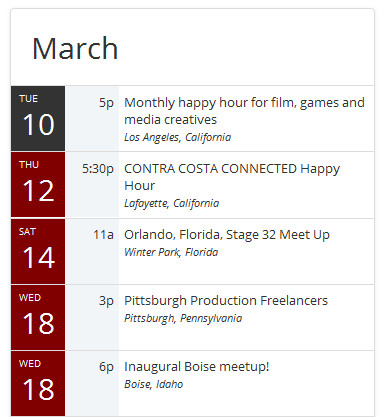
On the left side you will notice a calendar of events. This will list only the next 20 upcoming Stage 32 meetups anywhere in the world. Calendar will show you the date and time of the meetup along with the title and location where the meetup takes place. If you are attending a meetup, the date will show up on the black background. If you are not attending, the date will show up on the maroon background.
On the right, you will see the list of upcoming meetups, sorted to show upcoming meetups first. If you are the organizer of a meetup, you will see a green icon with a pen, allowing you to edit the meetup. If not, you will see either a calendar icon or a checkmark icon indicating that you have RSVP’d for said meetup. Here is a detailed explanation of this section:
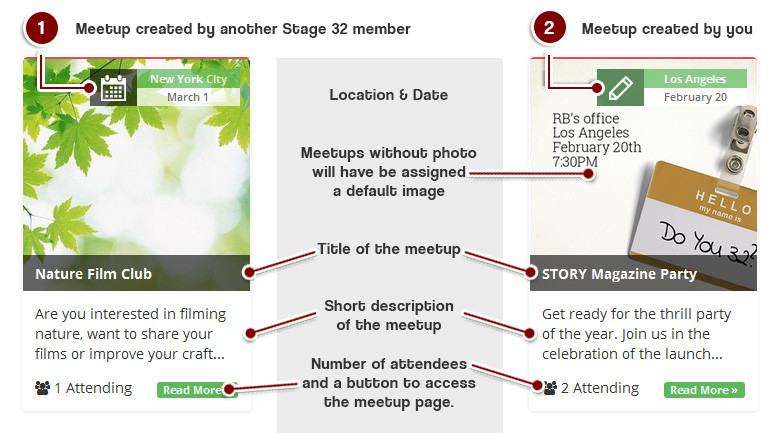
That’s it for the meetup list page. Let’s now take a look at the meetup page itself. Here is what you might find in the left sidebar of a meetup page:
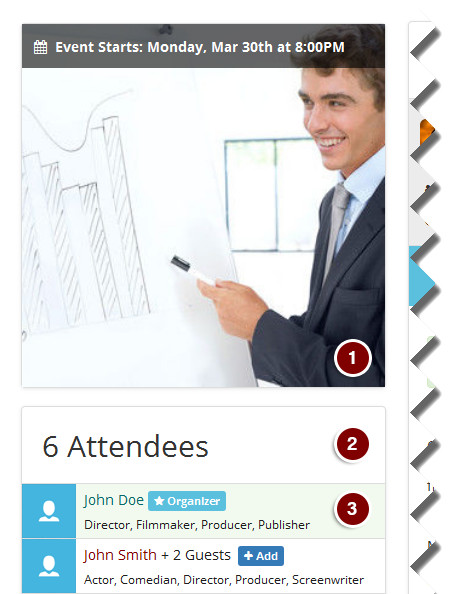
- Main image for the meetup with event’s start time and date.
- Number of attendees who already RSVP’d to this meetup.
- Organizer of the event will be highlighted as shown.
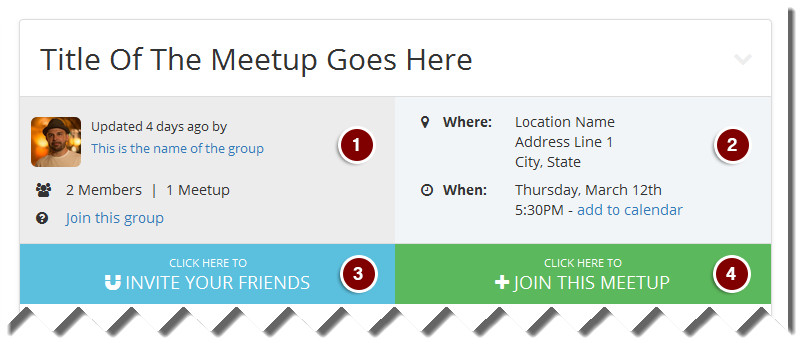
- Information about the group or organizer of the meetup.
- Important information about the meetup including location, date, time of the event and an option to add the event to your social calendar.
- An option to invite your friends to the meetup. You can invite creative in your Stage 32 network, but if you wish, you can also send invitations outside of Stage 32.
- An option to join the meetup.
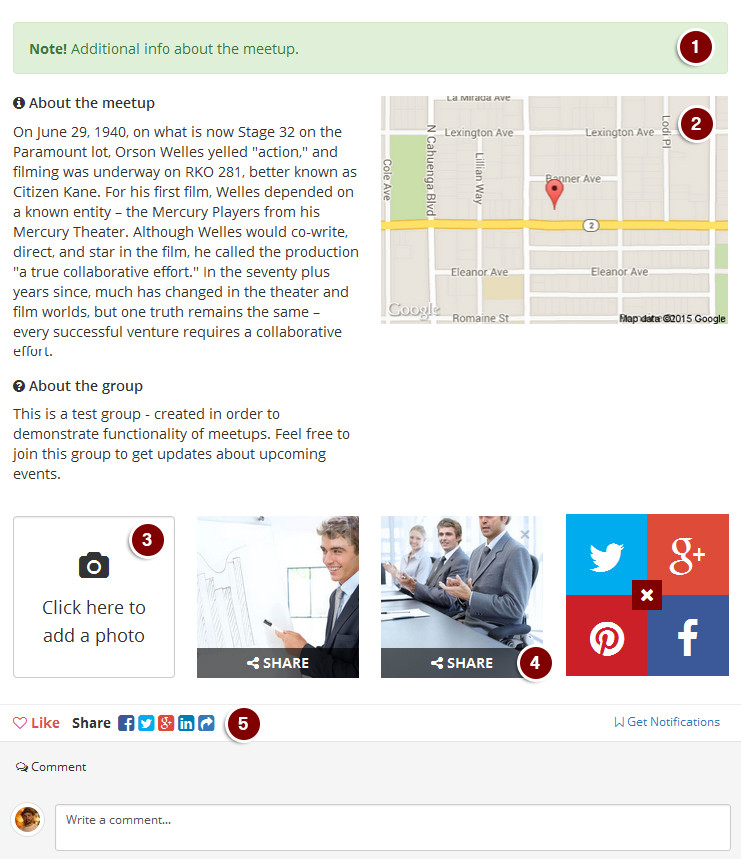
- Note can store pertinent information about the meetup (i.e. where to park or the name of the person who will be running the meetup)
- Map will be provided given that the address information of the meetup is properly filled out. You can click on the map to be taken directly to Google for navigational purposes.
- By default adding a photo is disabled – this functionality becomes enabled once the meetup begins – make sure to take some photos and share them right on the meetup page.
- Once you’ve taken the photo, you can also share it on your social media – tweet it, pin it or share it on Google Plus and Facebook with ease.
- Do not confuse step #4 with sharing the meetup itself. To share the meetup to other social networks click one of the share icons right above the comments.
Once the meetup begins, “Click here to add a photo” button will turn blue and all attendees will be able to add a photo right to the meetup page. You can easily add a photo right from your phone – go ahead and give it a shot. Organizers, if you feel that a photo is inappropriate, you will be able to remove it with a single click:

JOINING A MEETUP:
Joining a meetup is quite simple, you just need to click “Join this meetup” button:

And decide whether you are coming by yourself or if you are bringing guests:
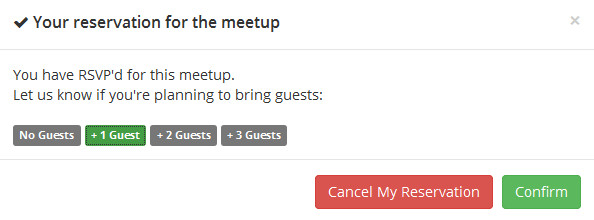
You can RSVP with up to 3 guests. Once done simply click “Confirm” and you will be automatically added to the list of attendees.
SHARING A MEETUP:
There are many ways to share a meetup – the one you might already be familiar with is by sending it to facebook, twitter, google or linked-in right from the bar above the comments:

To invite your friends to the meetup click the “Invite your friends” button:

You will then see a window asking you whether you want to invite somebody who is already a member of Stage 32 or if you want to invite some creative friends who are not yet on Stage 32:
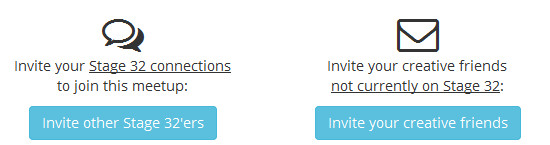
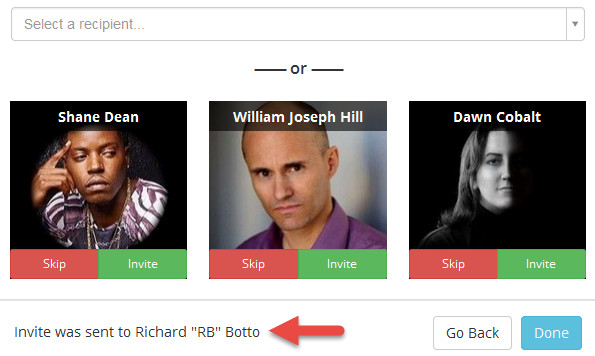
If you choose former, you will be able to search for a member by name, or invoke a single click invitation to any Stage 32 members who are in your network and reside within 50 miles of the meetup location. After an invite has been sent, a message will show up in the footer of the window letting you know that the person has been successfully invited:
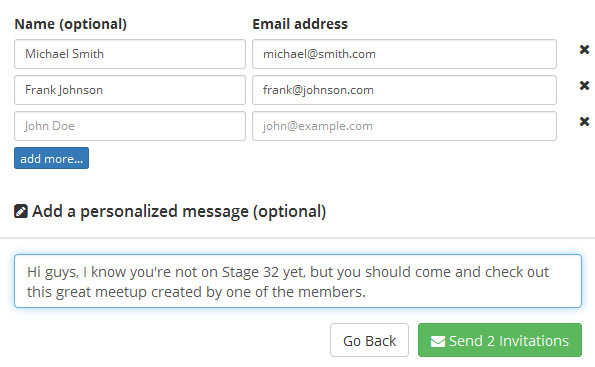
If you choose the latter option, you will be able to invite your friends by inputting their email addresses and optionally a personalized message to go along with the invitation. Once done, click the “Send” button.
If you choose the latter option, you will be able to invite your friends by inputting their email addresses and optionally a personalized message to go along with the invitation. Once done, click the “Send” button.
So, what are you waiting for?
Head over to Stage 32 Meetups now!
Like this blog post? Please share it on social media (Facebook, Twitter, LinkedIn, email etc) by using our shiny new social media buttons at the top of the blog. Or post to your personal blog and anywhere else you feel appropriate. Thank you.
As always, we welcome thoughts and remarks on the content above in the Comments section below...
| RB's Stage 32 News, Notes, Discussions and Other Fun Stuff (March 13, 2015) |

| You're Only as Good as the Film You're About to Make |


Search Stage 32 Blog
There are now 4040 blog posts for you to enjoy. Search them all by tags below.
Acting, Advice, Cinematography, Coffee & Content, Composing, Contests, Distribution, Featured, Filmmaking, Financing, Inspirational, Networking, Producing, Screenwriting, Success Stories, Tips, Trending,Relevant Tags
Recommended Articles

How Stage 32 Script Services Make You A Better Writer

Green Lights and Grey Areas: Expanding Creative Collaboration in Publishing

Stage 32 Featured at the 43rd Torino Film Festival!

Forbes Spotlights Stage 32 Certification!

Don't Let the Momentum of November Write Club Die: How to Stay Active Into 2026 & Beyond!

Insider Intel: 2025- Your Year of Breakthroughs (+ What's Coming in 2026)

State of the Industry 2026 Now On-Demand: RB & Geoff Break Down What’s Next for Writers!

Coffee & Content: Why Your Pitch Needs to Be Human

4 Reasons To Have Audio Description On Your Film

7 Life Hacks For Creatives
 Register / Log In
